AWS CLI or AWS MCP?
What AWS shipped, a hands-on install you can reproduce, and where the new trust boundary sits
Companion piece: Webwright setup and how agents meet the real world — same theme, different surface: what changes when an agent stops reading and starts acting.
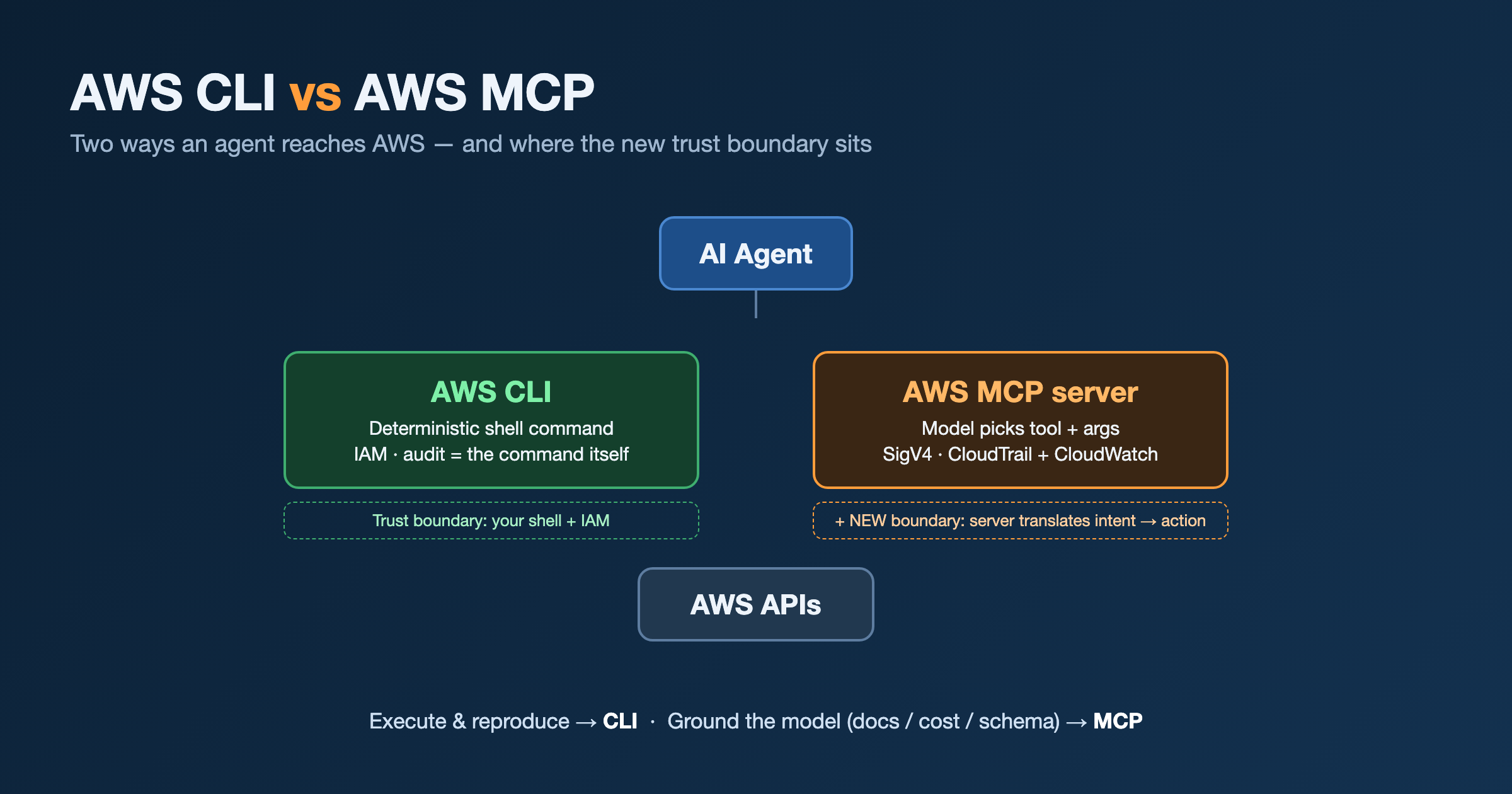
Someone asked me a sharp question this week: would you rather use the AWS CLI or AWS MCP — and why is AWS even shipping MCP?
The question has a hidden assumption. CLI and MCP are not two tools competing for the same job. They sit at different layers. One executes. One grounds. Picking “which” is the wrong frame; knowing when each earns its place is the right one.
So I installed one end to end, kept every command, and wrote it up so you can reproduce it in about five minutes.
What AWS actually shipped, and when
MCP (Model Context Protocol) is Anthropic’s open protocol for connecting LLM agents to tools and data. It landed late 2024 and the industry standardised on it fast. AWS’s response arrived in waves:
| When | What |
|---|---|
| 2025-05 | First open-source awslabs MCP servers — Lambda, ECS, EKS, Finch |
| 2025-07 | Price List MCP server |
| 2025-10 | MCP Proxy for AWS goes GA — bridges IAM/SigV4 to OAuth 2.1 |
| re:Invent 2025 | Preview of a single managed AWS MCP Server |
| 2026-05-06 | The managed AWS MCP Server is GA — search_documentation / read_documentation, a sandboxed run_script tool (server-side Python, IAM-scoped, no network), and a Skills framework. No charge for the server; you pay only for resources you create |
There are now 40+ open-source servers under awslabs/mcp, and AWS has announced an Agent Toolkit for AWS as the successor — notably adding IAM condition keys that distinguish agent actions from human ones, plus CloudTrail visibility.
That last detail is the tell. AWS is not shipping MCP to be nice. It is defending the interface layer. If developers stop opening the console and start asking a coding agent “how do I configure this,” AWS wants the agent to reach its grounded data — current docs, real cost, accurate schema — not a model’s stale training knowledge or a competitor’s tool. MCP is a distribution play, and grounding-against-API-drift is the product.
Hands-on: install the AWS Documentation MCP server
I picked the lowest-risk server that still proves the point: the AWS Documentation MCP server. It reads public docs. It needs no AWS credentials at all — which matters, because my only local profiles are landing-zone admin profiles, and wiring an agent to org-admin just to read documentation is the exact mistake this post warns about.
Everything below is the real path, in order. Client shown is Claude Code; the config block generalises to Cursor / Kiro / Amazon Q.
0. Prerequisites
You need uv (the Python package runner that provides uvx) and an MCP client. No AWS credentials, no AWS CLI required for this server.
1
2
3
# macOS — install uv without a curl|bash (Homebrew is auditable + upgradeable):
brew install uv
uv --version          # confirm it's on PATH, e.g. uv 0.11.x
uvx ships with uv. It runs a Python tool in an ephemeral, isolated environment — nothing is installed into your global Python.
1. Verify provenance before you run anything
uvx will download and execute a package. Confirm it is the real AWS Labs package, not a typo-squat, before you wire it to an agent. Check the PyPI page:
- Package
awslabs.aws-documentation-mcp-server, latest 1.1.24 (2026-05-13) - License Apache-2.0, maintained by AWS Labs, source
github.com/awslabs/mcp
The awslabs. namespace prefix on PyPI is controlled, which is the signal you want.
2. Register the server with your agent
1
2
claude mcp add-json aws-documentation --scope user \
  '{"command":"uvx","args":["awslabs.aws-documentation-mcp-server@latest"],"env":{"FASTMCP_LOG_LEVEL":"ERROR"}}'
1
Added stdio MCP server aws-documentation to user config
If your client isn’t Claude Code, drop the same shape into its MCP config file (.mcp.json, mcp.json, etc.):
1
2
3
4
5
6
7
8
9
{
  "mcpServers": {
    "aws-documentation": {
      "command": "uvx",
      "args": ["awslabs.aws-documentation-mcp-server@latest"],
      "env": { "FASTMCP_LOG_LEVEL": "ERROR" }
    }
  }
}
3. Verify it connects
1
claude mcp list
1
aws-documentation: uvx awslabs.aws-documentation-mcp-server@latest - ✓ Connected
First run is slower — uvx is fetching the package into its cache.
4. Load the tools — connected is not the same as callable
Here’s the gotcha that costs ten confused minutes. Adding a server mid-session connects it (the health check above goes green) but does not load its tools into the already-running session. In Claude Code I reloaded:
1
2
/reload-plugins
/reload-skills
Starting a fresh session does the same thing. Only after the reload did the server’s tools — search_documentation, read_documentation, read_sections, recommend — become callable.
5. Prove it works end to end
Ask the agent something that forces the new tool. A search_documentation call for “AWS MCP Server managed model context protocol” came back with live URLs:
1
2
3
1. https://docs.aws.amazon.com/quick/latest/userguide/mcp-integration.html
2. https://docs.aws.amazon.com/eks/latest/userguide/eks-mcp-introduction.html
3. .../cdk/api/v2/.../McpServerTargetConfiguration.html
Real, current documentation URLs — the grounding the model would otherwise have to guess at. End to end works.
6. Pin the version for anything durable
uvx ...@latest pins nothing. Convenient for a demo, a liability for anything you keep: @latest means the code your agent runs can change under you between restarts — that’s curl | bash with extra steps. For real use, pin it like any dependency. To change a server, remove and re-add:
1
2
3
claude mcp remove aws-documentation --scope user
claude mcp add-json aws-documentation --scope user \
  '{"command":"uvx","args":["awslabs.aws-documentation-mcp-server@1.1.24"],"env":{"FASTMCP_LOG_LEVEL":"ERROR"}}'
7. (Not run) the managed AWS MCP Server
The GA managed server is a different setup — it proxies through mcp-proxy-for-aws to a remote endpoint with SigV4 against your AWS credentials:
1
2
3
# Illustrative — this reaches real AWS APIs with YOUR IAM identity. Do not point it at admin.
claude mcp add-json aws-mcp --scope user \
  '{"command":"uvx","args":["mcp-proxy-for-aws@latest","https://aws-mcp.us-east-1.api.aws/mcp"]}'
I did not wire this one. With admin-only profiles, that command hands an LLM a tool that can act as org admin. The responsible path is a dedicated least-privilege (start read-only) profile — a deliberate decision, not a default.
Installed isn’t the same as used
A fair question once it’s wired in: how does the agent know to reach for the pricing tool when you ask it to estimate a cost?
It doesn’t, exactly. When a server connects, the client pulls each tool’s name, description, and input schema into the model’s context. The agent then picks a tool by matching your intent against those descriptions — the Documentation server even ships a “Tool Selection Guide” that tells the model when to use search_documentation versus read_documentation. That is the whole mechanism: description-driven, semantic, heuristic.
Heuristic means not guaranteed. The model can just as easily skip the tool and answer “t3.medium is about $30/month” from training data that’s two price changes stale. Installing a grounding server does not force grounding.
So you govern it:
- Pin the behaviour in instructions. In your
CLAUDE.md/ project rules: “For AWS pricing, call the pricing tool — never estimate from memory.” The description tells the model the tool exists; your system prompt makes it use it. - Keep the server set small. Too many tools blur selection — the model picks worse when hundreds of descriptions compete (tool confusion). Wire up what you’ll actually use.
- Good descriptions are the server’s job; governance is yours. Don’t assume the vendor’s wording is enough for your workflow.
Same line as “connected ≠ callable” above: wiring it up is step one; making the agent actually rely on it is a separate, deliberate act.
When I reach for which
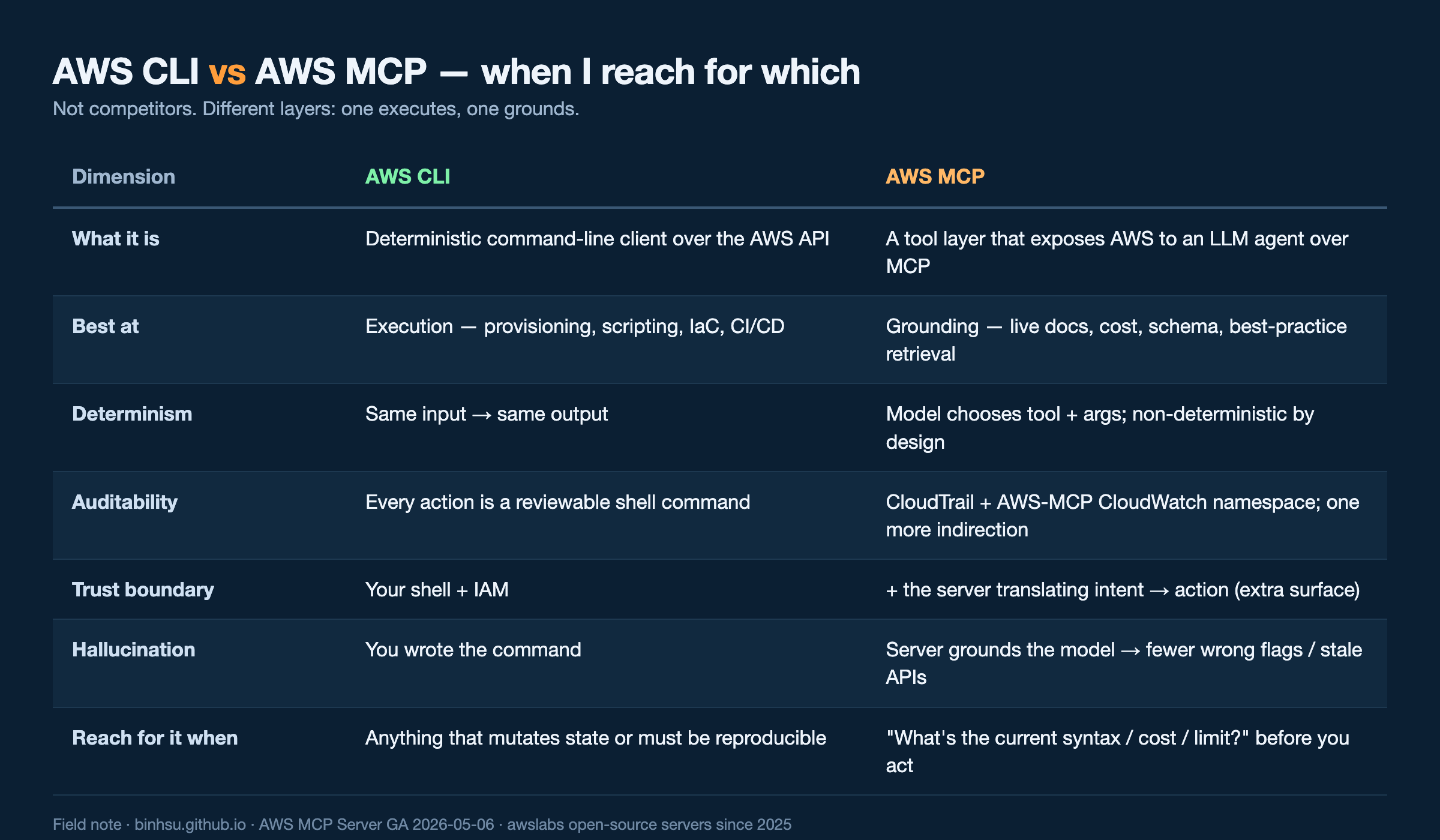
| Dimension | AWS CLI | AWS MCP |
|---|---|---|
| What it is | Deterministic command-line client over the AWS API | A tool layer that exposes AWS to an LLM agent over MCP |
| Best at | Execution — provisioning, scripting, IaC, CI/CD | Grounding — live docs, cost, schema, best-practice retrieval |
| Determinism | Same input → same output | Model chooses tool + args; non-deterministic by design |
| Auditability | Every action is a reviewable shell command | CloudTrail + AWS-MCP CloudWatch namespace; one more indirection |
| Trust boundary | Your shell + IAM | + the server translating intent → action (extra surface) |
| Hallucination | You wrote the command | Server grounds the model → fewer wrong flags / stale APIs |
| Reach for it when | Anything that mutates state or must be reproducible | “What’s the current syntax / cost / limit?” before you act |
My default is unchanged: CLI for anything that mutates or must be reproducible, MCP for knowledge and grounding. The CLI’s value to an agent is that every action is a line you can read back, diff, and replay. The MCP server’s value is that it keeps the model from confidently inventing a flag that was renamed two releases ago.
The part a senior engineer says out loud
An MCP server is a new trust boundary. It runs with credentials and you are trusting it to translate intent into action correctly. The CLI is transparent — you see the exact command before it runs. The MCP server is an intermediary, and it deserves the same scrutiny as any third-party component holding your keys:
- Which server, what scope? Read-only beats admin. A docs server needs zero credentials — give it zero.
- Vet the supply chain. Confirm the publisher and namespace before
uvxpulls it; pin the version.@latestagainst an agent iscurl | bashwith extra steps. - Keep the audit trail tight. CloudTrail plus the managed server’s CloudWatch namespace and IAM condition keys exist precisely so agent actions are distinguishable and reviewable. Use them.
So: not CLI or MCP. CLI to act, MCP to know — and the MCP server gets vetted like anything else you hand a credential.
Field note. n=1: one machine, one afternoon. The Documentation-server steps were run and verified; the managed-server credential setup is described, not run. Commands are accurate as of 2026-05-29; @latest versions drift by design.