Your Laptop Is a Valid SAML Identity Provider
Testing SSO against a cloud service usually stalls on access: you need a staging tenant or someone else's identity provider. For SAML you need neither. A browser carries every hop, so an identity provider on localhost works against a real online service.
Most SSO questions are answerable by experiment. What does the service do on a user’s first login? Which attributes does it read, and under which names? What does it do when an assertion is malformed? The blocker people assume is access: you need a staging tenant from the vendor, or a test identity provider that someone else runs, and neither is yours to hand out.
For SAML, that assumption is wrong. You can run the identity provider on your own laptop, with no public hostname, and test it against a real online service. No firewall exception, no tunnel, no one else’s blessing. This post is how, and the one condition under which it doesn’t work.
Why a laptop is enough
The instinct is that an identity provider has to be reachable: a real domain, a certificate a browser trusts, something the service’s backend can call. For the flow that matters, none of that is true, and the reason is worth internalizing: in SAML Web SSO, the service provider never makes a server-to-server call to the identity provider. Every hop of the login is carried by the browser. The assertion the service receives is verified offline, against a certificate that arrived earlier inside a metadata file someone uploaded by hand.
Here is the flow with that fact made visible:
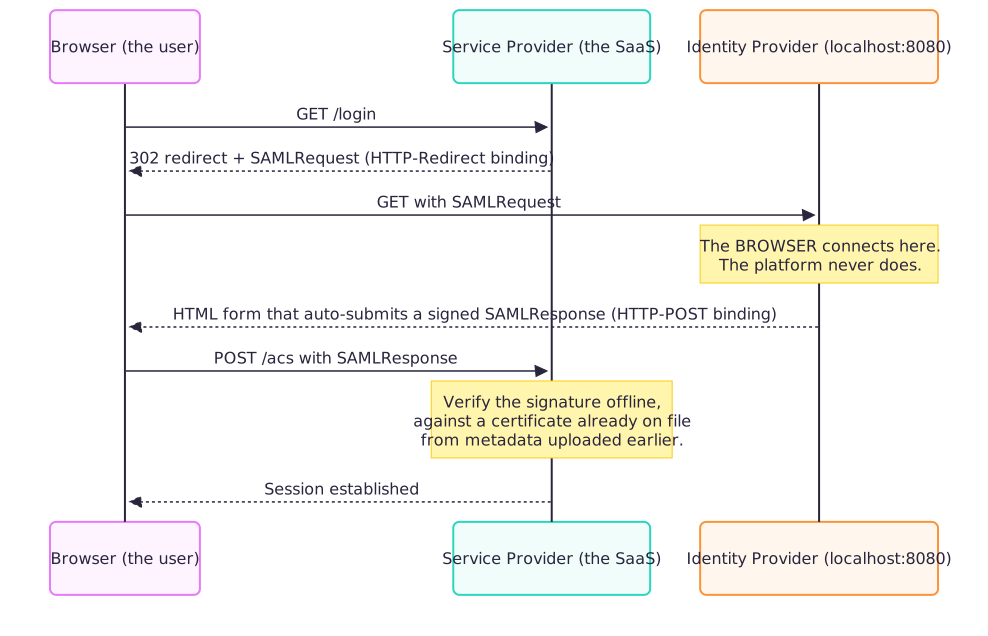
Look at where localhost:8080 shows up: only as the target of a redirect the browser follows. The service’s own servers never touch it. So http://localhost:8080 is a completely valid identity provider for this purpose, with one precondition, and it’s the first thing to check before you install anything: the service has to accept an uploaded metadata file, rather than insisting on fetching metadata from a URL. A URL fetch is a server-to-server call, and a server-to-server call cannot reach a laptop with no public address. If the integration only offers “enter the metadata URL”, this approach is closed to you.
Setting it up: Keycloak, and the chicken-and-egg that isn’t one
I used Keycloak in Docker (quay.io/keycloak/keycloak:26.0.7), started in dev mode with a bootstrap admin user, and created a realm for the lab. A realm’s SAML metadata is served at a fixed path:
1
http://localhost:8080/realms/<realm>/protocol/saml/descriptor
What matters is what that endpoint does not require: a client. SAML setup looks like a deadlock at first. The identity provider needs the service provider’s entity ID and reply URL before it can be configured for it, and the service needs the identity provider’s metadata before it will show you those values. But the realm descriptor is a per-realm document, not a per-client one. So the order is:
- Download the realm descriptor from the URL above and save it as a file.
- Upload it to the service in its SSO / SAML settings. The service now shows you its own two values: the SP entity ID and the Assertion Consumer Service (ACS) URL.
- Register a SAML client in Keycloak using exactly those two values: client ID = the SP entity ID, valid redirect URI and ACS POST binding URL = the ACS URL. Choose the NameID format the service expects (email is the common one), and make sure assertions are signed.
- Add a test user to the realm, with the attributes the service maps (email, name, whatever it documents).
- Log in through the service’s SSO entry point. Your browser goes to
localhost:8080, you sign in as the test user, and the browser posts the signed assertion back to the service.
No deadlock, no guessing anything up front.
What to check after a login
The login completing is only the first reading. The useful part is what the service did with the assertion:
- Did it accept the assertion? A signature or audience mismatch usually fails loudly on the service’s side; read the error rather than retrying.
- What did it create or update? Open the user in the service’s member list and compare each field with what your test user sent. A field that stayed empty is a finding: either the attribute name doesn’t match what the service reads, or the value was rejected without telling you.
- What happens on the next login? Change an attribute in Keycloak, log in again, and see whether the service updates it, keeps the old value, or clears it. That one experiment answers questions that documentation often leaves vague.
Because the identity provider is yours, each of these is a two-minute change and a re-login, not a ticket to someone else’s team.
Where the trick stops working
Two limits are worth knowing before you build one:
- Only your own browser can log in. Nobody else’s machine can reach
localhost:8080. This is an evaluation tool, not something to demo to a colleague over a screen share. - Not every SAML binding is browser-mediated. Keycloak’s metadata advertises
SOAPandHTTP-ArtifactalongsideHTTP-RedirectandHTTP-POST. The first two require the service provider to open a connection straight to the identity provider, a real backchannel that no browser carries. If a service negotiates one of those instead ofHTTP-POST, the login fails partway through, for a reason that has nothing to do with misconfiguration.
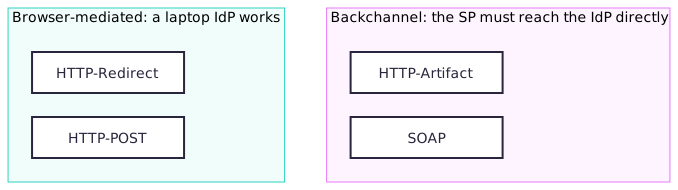
That diagram is the whole risk assessment: the left column is where a laptop with no public address is a perfectly good identity provider. The right column is where it isn’t, and no amount of correct configuration fixes that.
One more detail, which I’ll tell against myself: test users’ email addresses belong in a domain reserved by RFC 2606, example.com being the obvious one, chosen so it can never collide with a real login. Point a lab at a domain your organization actually owns and you risk sending a colleague’s real SSO attempt to your laptop. I used an owned domain anyway. Nothing went wrong, but “nothing went wrong” is not the same as “was safe”, and the next lab goes back to the reserved space.
The one gotcha that had nothing to do with SAML
Before any of the above, docker pull on the Keycloak image failed on the first try:
1
x509: certificate signed by unknown authority
curl against the same registry, from the same machine, worked fine. That asymmetry is the tell. The laptop sits behind a TLS-inspecting proxy whose certificate the host OS trusts, but Docker Desktop’s container runtime runs inside its own Linux VM, which never saw that certificate. Host tools inherit the host’s trust store; the container runtime does not. The fix was installing the proxy’s CA into the VM’s trust store, not the host’s. Host curl working was never evidence that the daemon could reach the registry, because they are not the same trust boundary. Worth knowing before you read a failed pull as a network outage.
The general lesson
None of this is really about SAML. It’s about knowing, for any protocol you’re testing, which hops are genuinely server-to-server and which are merely relayed by something you already control: a browser, a CLI, a webhook receiver. That distinction tells you whether a laptop with no public address is a legitimate stand-in for the other end of an integration, or a dead end. For SAML Web SSO with the common bindings, the answer is that your laptop was always enough. Nobody needed to lend you a tenant.