A Kubernetes bedtime story
Eleven chapters, three layers each: a story a five-year-old can follow, a picture with jokes for the people who carry the pager, and what each idea cost me in production.
中文版:K8s 晚安故事書
Children’s books carry large ideas in small sentences. The very hungry caterpillar is a lesson in metamorphosis; nobody reading it aloud mentions the word. Kubernetes deserves the same treatment, because its whole design is one idea repeated: every object exists because the one before it left something broken. A Pod dies, so there is a Deployment. The Deployment’s Pods change address, so there is a Service. Keep pulling that thread and the YAML stops looking arbitrary.
This post tells that thread as a bedtime story. Each chapter has three layers, and you can stop at whichever one suits you:
- The story. Short enough to read to a five-year-old.
- The picture. Accurate enough for a review, with a few jokes hidden for anyone who has been paged at 02:00.
- For the grown-ups. What the idea looked like on a real platform: five AWS accounts, three regions, four to five million requests a day. The incidents are mine; the lessons cost real money.
The chapter list and the problem-to-fix framing come from Akhilesh Mishra’s eleven-part series, which is worth reading in full; each chapter below links to its original. The stories, the diagrams, the production notes and the corrections are mine.
Chapter 1: One big house, many small houses, and a butler
The story. Once upon a time, every program lived in one big house. When the kitchen flooded, the lights went out everywhere. So people built many small houses instead, one for each job. Now a flood stayed in one house. But who would notice when a small house fell down, and who would tell the neighbours when a family moved? A butler arrived. He rebuilt fallen houses, added new ones when guests came, and gave every street a name that never changed. His name was Kubernetes.
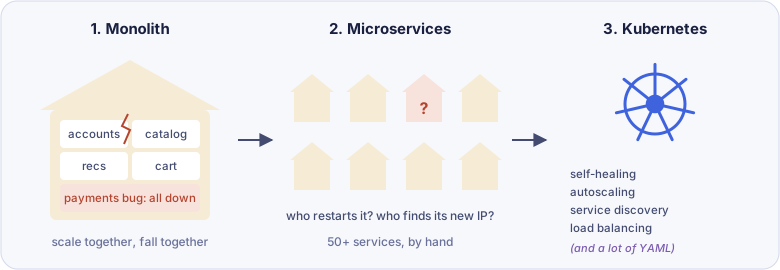
For the grown-ups. The source makes a point most introductions skip: not everything belongs on Kubernetes. On the platform I ran at E2 Nova, the SIP and RTP voice stack stayed on EC2 with Auto Scaling groups. Container networking does not handle massive UDP port ranges gracefully, and carrier firewalls whitelisted a pool of Elastic IPs pinned one per node, which is an ASG shape, not a Kubernetes one. When the migration switcher needed its own home, it went to ECS, not EKS: a single-purpose service with no neighbours gains nothing from the Kubernetes ecosystem except the cost of operating it. Stateless backend services went to EKS, where Kubernetes wins clearly. Per-workload fit, not a default.
Original: Stop over-complicating Kubernetes
Chapter 2: Everyone talks to the front desk
The story. The butler’s house has a front desk. Nobody walks past it. You say who you are, the desk checks whether you may do what you ask, and only then writes it in the big book. Behind the desk, a watcher compares the book with the real world all night, and a dispatcher decides which room each guest sleeps in.
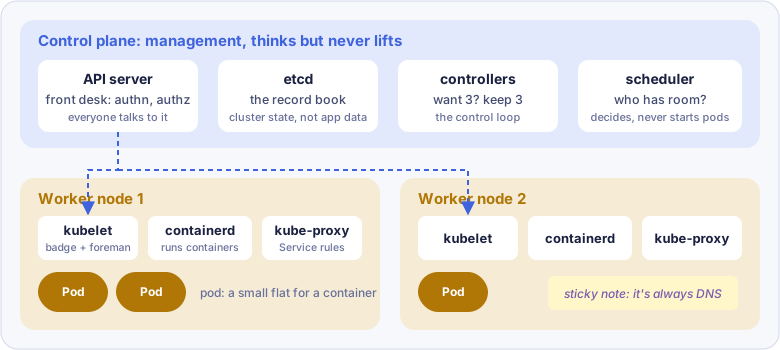
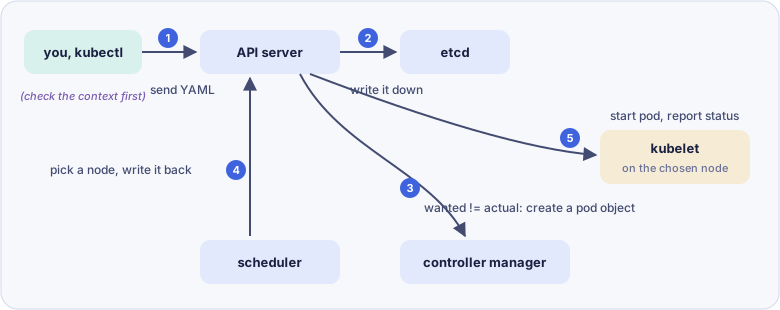
The scheduler never calls a worker. It writes its decision back through the API server, and the kubelet on the chosen node picks it up. That single path is why Kubernetes can enforce consistency, authorisation and an audit log in one place.
For the grown-ups. The front desk only helps if it can tell people apart. When I took over our EKS clusters, the team authenticated with the same long-lived IAM access keys, so every kubectl action in CloudTrail belonged to one shared identity. Nobody could say who did what. I moved us in three steps: shared keys, then aws sts get-session-token (temporary, but it still needed long-lived keys to call STS), then aws sso login with MFA at the identity provider. After that, every action in the cluster had a person’s name on it. The API server had been checking credentials all along; we had just given it nothing to distinguish.
One more line from the source deserves repeating: base64 is not encryption. Anyone who can read a Secret can decode it.
Original: Building your first real Kubernetes application
Chapter 3: Counting sheep
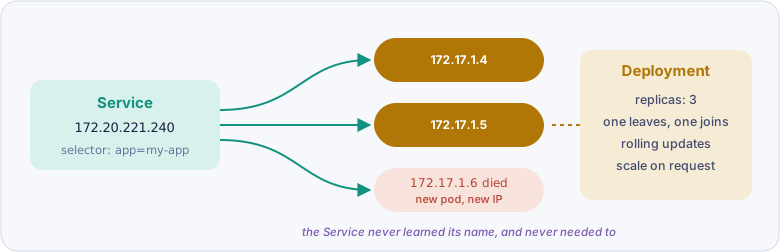
The story. This is the chapter you count like sheep. A Pod fell asleep and never woke up, so a Deployment promised to always keep three awake. The Pods kept moving rooms, so a Service gave them one door with a name on it. One Pod was awake but staring at the wall, so a night light checked who was really ready. And so on, one sheep at a time, until you are asleep.
- Pod dies with its node, nobody brings it back → Deployment
- New Pod, new IP, callers lose it → Service, which finds Pods by label
- Pod is running but stuck, still gets traffic → liveness and readiness probes
- Ten LoadBalancer Services, ten bills → Ingress
- Ingress is only rules → Ingress controller
- Config baked into the image → ConfigMap
- Passwords in a ConfigMap → Secret, with encryption at rest and access control
- One Pod eats the node → requests and limits
- 100 users at night, 10,000 at noon → HPA
- HPA adds Pods, nodes are full → Karpenter
- Postgres restarts, data gone → PersistentVolume
- Every disk created by hand → PVC and StorageClass
- Three database replicas on one disk → StatefulSet
- Three copies of the same YAML drift apart → Helm
- Everyone in
default→ Namespaces - Namespaces are walls on paper → RBAC
- One team’s load test starves the others → ResourceQuota and LimitRange
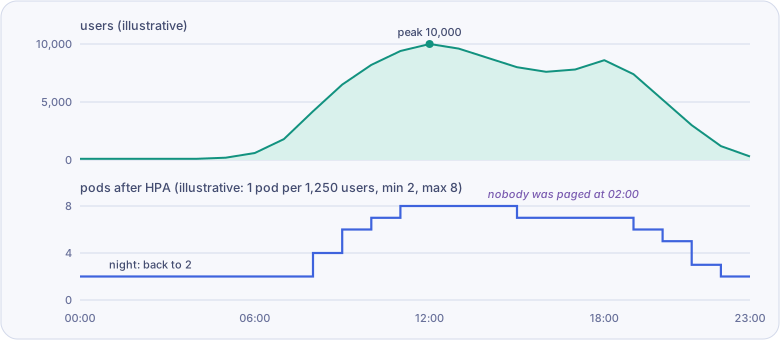 Illustrative data, not a measurement. Two panels share the time axis and keep their own y-axes.
For the grown-ups. Steps 6 and 11 are the same lesson from two directions: a Pod is disposable only when everything it needs to remember lives somewhere else. Our self-hosted GitLab ran on EKS from a Helm chart, with its settings in a database. During cluster upgrades the Pods were recreated from nothing, read their configuration back, and came up as they were. I never had to open the GitLab admin UI to put a setting back. If an upgrade depends on someone remembering where to click, the Pod was never really disposable.
Original: I wish someone had explained Kubernetes to me like this
Chapter 4: Moving to the big city
The story. The butler moved his houses to a big city called EKS. Visitors now ask the city’s map (Route 53) for the way, walk through one big gate (the load balancer), and are sent left for the shop and right for the kitchen. The pantry sits in a locked cellar that only the kitchen can open.
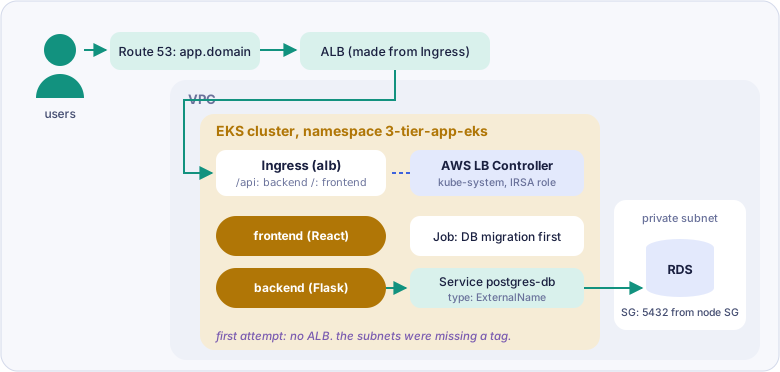
The order matters: the database migration runs as a Job before the backend starts, and the AWS Load Balancer Controller gets its IAM role through OIDC (IRSA) before any Ingress can become an ALB.
For the grown-ups. My own move to EKS had no Ingress at all. The old world sent traffic from a reverse-proxy cluster straight to an apache2 instance per deployment, with the microservices pinned to that instance and unable to scale. I inserted one indirection: the reverse proxy now sent everything to an internal ALB that routed by subdomain into target groups. A target group does not care whether its target is an EC2 instance or a Kubernetes Service, so I bound each new Service into the existing target group with TargetGroupBinding and cut over one service at a time. The reverse-proxy team and the application teams never had to know the substrate moved, and the microservices gained horizontal scaling through HPA. The extra hop cost about 50 ms, which we measured and accepted. Strangler fig at the infrastructure layer: the application should not need to know it is being migrated.
Original: Kubernetes real-world project, part 1
Chapter 5: A lock for the front door
The story. The city wanted a lock on every door. The locksmith only gives locks to people who can prove the house is theirs. So a little helper, cert-manager, pins a note to the city map, the locksmith reads it, and a lock arrives. The helper even comes back before the lock wears out.
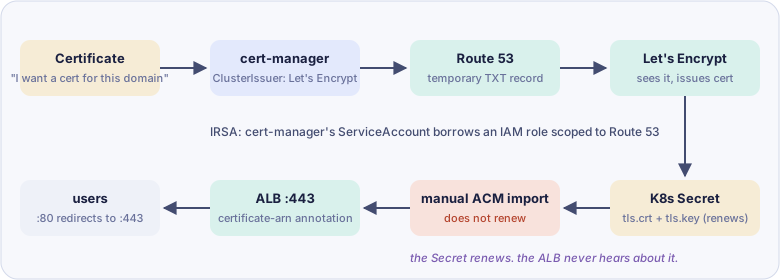
For the grown-ups. The source ends by saying cert-manager renews the certificate automatically. It does renew the Kubernetes Secret. The ALB, though, reads the copy you imported into ACM by hand, and that copy never hears about the renewal. Let’s Encrypt certificates are short-lived, so this setup has a quiet expiry date built in.
Our reverse-proxy cluster solved the same problem the other way round: we moved TLS termination to the ALB, with the certificate living once in ACM and the backend instances seeing plain HTTP. That removed per-instance certificate distribution entirely. If the load balancer is AWS-managed anyway, an ACM-issued certificate is the simpler path.
Original: Kubernetes real-world project, part 2
Chapter 6: The diary and the thermometer
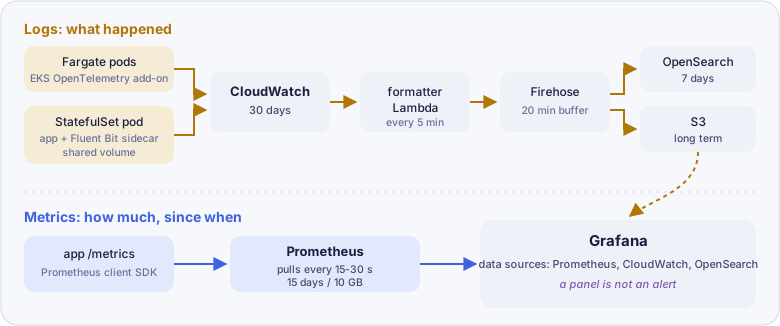
The story. Before bed, the city writes two things. A diary says what happened today. A thermometer says how warm it was, every few seconds, all day. If you only keep a diary, you know there was a fever but not when it started.
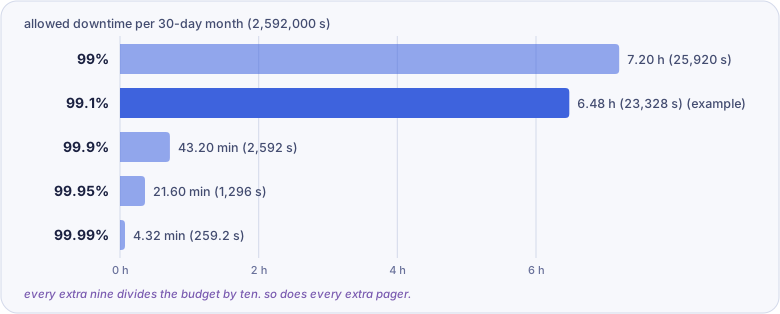 A 30-day month is 2,592,000 seconds. At 99.1%, the allowance is 23,328 seconds, about 6.48 hours.
For the grown-ups. The most useful thermometer I ever built was one that customers could not see. monitor.py logged in over HTTPS and ran a few simple operations every three minutes against each cluster. I put it deliberately below the retry layer, because retries absorb exactly the pressure you most need to see. It was built for a different failure (chapter 7), and then it started showing intermittent errors that no dashboard explained.
The errors lined up with spikes in Aurora usage and IO latency. Digging into the logs turned up more than 6,000 backend timeouts a day that frontend retries had been hiding; the customer-facing success rate stayed at SLA the whole time. The applications opened connections without pooling. Rewriting twenty services was not an option, so ProxySQL went in at the infrastructure layer: 5,000 static connections became 29 persistent ones, queries within 5 ms at P95 went from 53% to 87%, and the timeouts disappeared with no application code changed.
A panel for those timeouts had existed all along. Nobody had wired an alert to it. So the second fix was moving our Grafana alerts out of the UI and out of my head: a Helm template, a ConfigMap sidecar, twelve rules in Git across two pull requests, each marked provisioned so nobody could hand-edit it into drift.
Original: How I set up monitoring for real microservices on EKS
Chapter 7: Which pub do the Pods sleep in?
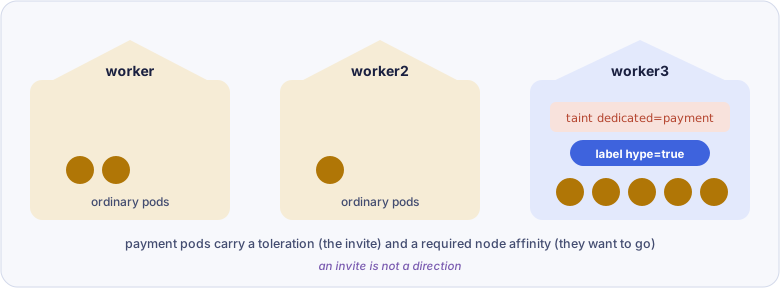
The story. There are three pubs in town. One has a sign on the door: invitation only. Some Pods carry an invitation, but an invitation does not make you go; it only lets you in. So the town made that pub famous, and now the Pods with invitations want to go there. When the famous pub is full, the strict ones wait outside all night. The relaxed ones go somewhere else.
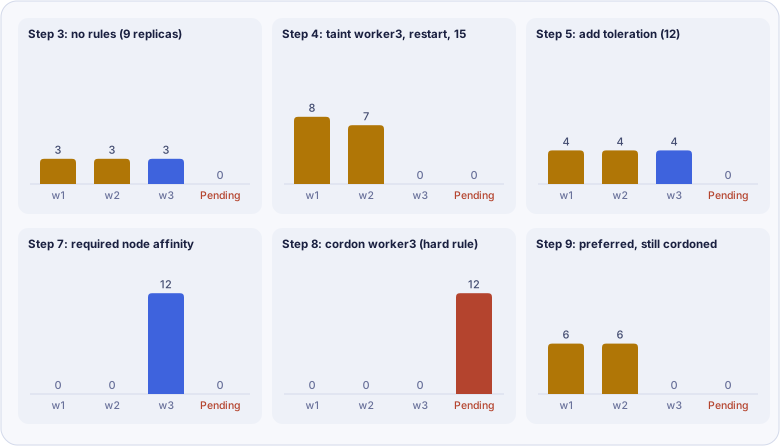 Illustrative, drawn from the lab’s description; exact counts vary per run.
| Mechanism | Sits on | Does |
|---|---|---|
| Taint | Node | Keeps Pods out unless they tolerate it (NoSchedule blocks new Pods, NoExecute also evicts running ones) |
| Toleration | Pod | Allows entry. Does not send the Pod there |
| Node affinity | Pod | Pulls a Pod to labelled nodes; required can leave it Pending, preferred falls back |
| Pod affinity | Pod | Places a Pod near other Pods (chatty pairs, less cross-zone traffic) |
| Pod anti-affinity | Pod | Keeps replicas apart so one node failure does not take them all |
For the grown-ups. “Waiting outside all night” is not a hypothetical. Before Karpenter, our EKS nodes ran in the Taipei local zone, where instance-type variety was thin and demand was high. When the requested type was unavailable, the cluster simply waited. Nothing crashed, nothing restarted, nothing paged. Pods sat Pending and the service quietly stopped growing. That silent class of failure is why monitor.py existed. Karpenter, and later the real Taipei region (ap-east-2), removed the cause structurally. The lesson I kept: a hard scheduling constraint on a scarce resource is an outage you have pre-approved.
Original: Kubernetes doesn’t care where your Pods land
Chapter 8: The night the Pods would not get up
The story. One night, fifteen Pods would not get out of bed. Five grown-ups spent two hours guessing. The answer was that someone had taken away the road to the shop where the Pods buy their clothes. The moral: do not guess. Look in the same order every time.
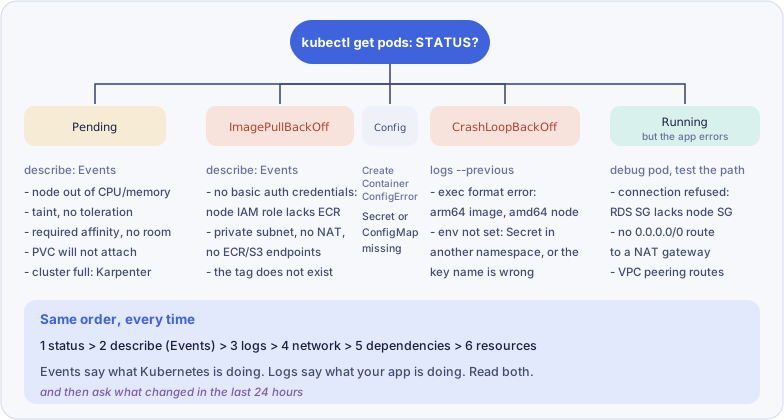
For the grown-ups. The order I trust starts one step before the source’s: contain first. At E2 Nova a newly released API leaked file descriptors until the whole service ran out. The fix for users was not the fix for the bug. I disabled that one API at the gateway, the rest of the endpoints stayed up, and we found the leak afterwards. Downtime will not wait; the root cause will.
The source’s last story, a failing disk behind random CrashLoopBackOffs, has a cousin in my notes: a sixty-minute platform lockup caused by renaming a MySQL ENUM, which forced a full table rewrite and held a metadata lock. Twenty microservices looked broken; the database was the only thing wrong. The fixes were a production-sized, anonymised clone that every schema migration must pass, and a pull-request check for ALGORITHM=COPY risk.
Original: Kubernetes troubleshooting scenarios
Chapter 9: The toolbox
The story. In the butler’s shed, every tool has a story about the day it was needed. The hammer remembers the loose board. The torch remembers the night the lights went out. Nobody buys tools to fill the shed.
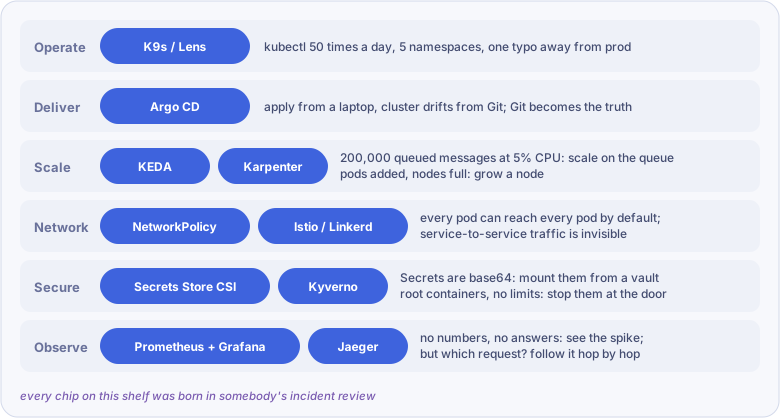
For the grown-ups. Here is one that I needed and did not have. Our backend containers on EKS ran as root, a habit carried over from embedded development, where root on the box was normal. I knew, and I did not enforce runAsNonRoot at admission during my tenure. In a regulated environment that is a day-one control: Kyverno or Gatekeeper rejecting root containers, with an explicit exception process for legacy workloads still being migrated. Writing the gap down is part of the job; a tool shelf without the missing tool on it is a brochure.
Original: The Kubernetes ecosystem has a story
Chapter 10: Five questions before sleep
The story. The wise owl asks five questions at bedtime. Each one has a lazy answer, and the owl always knows when you give it.
| Question | Lazy answer | Answer the owl wants |
|---|---|---|
| A node dies. Now what? | Kubernetes reschedules it | You spread replicas beforehand (topologySpreadConstraints: zones hard, nodes soft), and you drain planned nodes behind a PodDisruptionBudget |
| Black Friday is coming | HPA will handle it | Load-test at about twice the expected traffic, pre-scale to about 1.5x, scale queues with KEDA and nodes with Karpenter, and plan the database, cache and CDN too |
| Something is on fire | Check the logs | Acknowledge, scope the time window in dashboards, read Events, query logs for that service and window, follow the trace ID, ask what changed |
| Latency is high | Add replicas | Co-locate chatty services, prefer same-zone endpoints (trafficDistribution: PreferClose), then fix the database path |
| Plan multi-region | Run two clusters | EKS is regional; one cluster per region behind a global entry point, one database writer, usually active-passive |
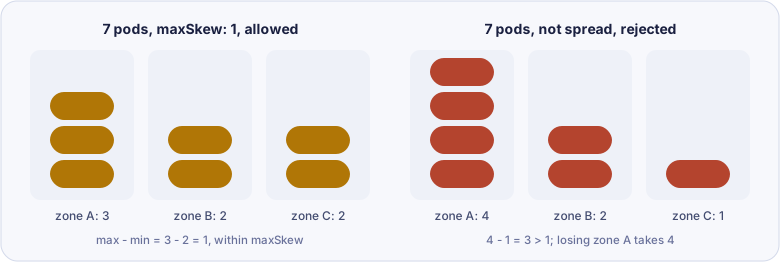
For the grown-ups. On the multi-region answer I can only speak for failover, because that is what we ran. Tokyo was primary and I led the build-out of the Taipei region. Each year’s disaster-recovery drill executed the path end to end: scale out the standby region’s Auto Scaling groups, promote the Aurora replica, validate the cross-region S3 restore, cut over with Route 53 health checks. External auditors reviewed it three years running. Active-active would have bought a lower recovery time at roughly twice the cost; for that platform, failover was the honest trade.
Original: If you can answer these 5 Kubernetes questions
Bonus: Kubernetes, Inc.
The story. Every company has two kinds of people. Managers do no real work; they make sure the work happens. Staff do the work. The front desk checks badges. The record book remembers everything. The watcher keeps the promised number of people at their desks. The dispatcher finds free desks. Each new person was hired because the company could not manage without them.
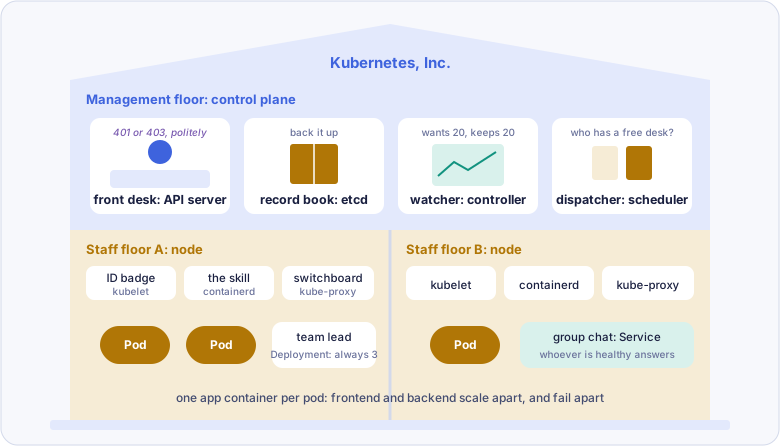
For the grown-ups. The cheapest gift a platform team can give is a room of your own for one night. Our backend engineers used to run unit tests on two divergent Docker setups, one in CI and one on laptops. I replaced both with one set of Kubernetes manifests that ran on Minikube locally and on Jenkins with EKS in CI. Each run got its own namespace with a UUID in its name, a fresh MySQL and MongoDB, and was deleted when the tests finished, on Karpenter spot capacity. Two branches could test side by side on one laptop without touching each other. Drift between local and CI did not shrink; it stopped existing, because there was only one definition left.
Original: You will never forget how Kubernetes works after reading this
Notes on the source
The series is good, and these notes are small. They matter because a simplification should not change the decision a reader would make.
- Controllers and the scheduler do not talk to each other. A controller creates a Pod object with no node; the scheduler watches for those and writes a node back; the kubelet starts it. Everything goes through the API server, as part 2 of the source itself says.
- kube-proxy does not carry all networking. Pod-to-Pod traffic across nodes is the CNI plugin’s job (the AWS VPC CNI on EKS). kube-proxy programs the rules behind Service virtual IPs.
- The ALB subnet tag. Public ALBs need
kubernetes.io/role/elb=1on public subnets;kubernetes.io/role/internal-elb=1is for internal load balancers on private subnets. The source’s command uses the right one; its prose names the other. - Imported ACM certificates do not renew with cert-manager (chapter 5).
- The Secrets Manager init-container example mounts a volume named
emptyDirwhile the containers mountsecrets, so it fails as written. The Secrets Store CSI Driver from part 9 is the cleaner route. - Checking image architecture.
aws ecr describe-images --query imageScanFindingsSummaryreturns scan findings, not the architecture;docker manifest inspectshows it.
Goodnight
If you keep one thing from tonight: Kubernetes is not a list of objects to memorise. It is a chain of problems, each solved by the next object. When a new tool shows up, ask which problem it was born from. If nobody can tell you, you probably do not need it yet.